SWaP for 2Q0980653 camera (MFK 3.0)
Full guide to unlocking SWaP on the 2Q0980653× front assistance camera (classic MQB, MFK 3.0).
After the procedure you can generate and apply your own SWaP codes (Sign Assist, aLDW, etc.) — same logic as ACC / pACC radar SWaP.
All steps are at your own risk. Wrong firmware or datasets can brick the camera or cause Dataset Implausible.
This guide does not apply to 5WA 980 653 (MQB-Evo) cameras — see MQB-Evo Travel Assist.
Sources
Ready flash files: A5_2Q0_SWaP_Solution on mibsolution.one (MQB_Solution → pACC → A5_2Q0_SWaP_Solution, login guest / guest).
What camera SWaP is
SWaP is a signed code (RSA) tied to VIN, ECU VCRN, and FEC list. Factory codes use VW’s key.
To generate codes yourself, the camera’s public key in EEPROM is replaced via a special flash. Then use the same generator as for the 2Q0 radar (A6 2C 69 …).
Lane Assist, FLA coding after SWaP — 2Q0 camera coding.
2Q0 camera FEC codes
| FEC | Purpose |
|---|---|
100E0F00 |
Sign Assist (VZE / TSR) |
100E1000 |
Advanced lane keeping (aLDW) |
100E1100–100E1500 |
Reserved (navigation) |
100E1600 |
Object detection |
100E1700 |
Pedestrian detection (FCPW) |
Full set for the generator (space-separated):
100E0F00 100E1000 100E1100 100E1200 100E1300 100E1400 100E1500 100E1600 100E1700
Requirements
| ECU | A5 / 00A5, camera 2Q0980653 (letter D/J/… — match SW) |
| Software | ODIS Service (online, CP removal), ODIS Engineering 17–18 |
| Adapter | VAS6154A / VNCI (grey 6154 preferred for flashing) |
| State | Camera in Component Protection (CP), stock flash and stock dataset |
| Generator | accGenerator.zip — afcg.exe, FecCalc.py (same as radar) |
Before flashing, restore stock parametrization if you used a custom dataset. Otherwise Dataset Implausible and broken VZE are common.
Overview
flowchart TD
    A[Camera in CP + stock SW/dataset] --> B[Flash PART1 / mod block 02]
    B --> C[Flash PART2 / block 04]
    C --> D[Remove CP via ODIS Service Online]
    D --> E{Public Key A6 2C 69…?}
    E -->|yes| F[Generate SWaP: VIN + VCRN + FEC]
    E -->|no| B
    F --> G[007 Transfer SWaP + 005 Activate SWaP]
    G --> H[003 Status: available / valid]
    H --> I[Dataset + A5/44/5F coding…]
Replace the SWaP public key
Two ways to install the custom public key (A6 2C 69 …). Steps after flashing (generate SWaP, activate, coding) are the same for both.
Archive A5_2Q0_SWaP_Solution on mibsolution.one provides two files per SW version:
| File | Content |
|---|---|
2Q0980653*_PART1.odx-f |
Modified block 02 (custom public key) |
2Q0980653*_PART2.odx-f |
Block 04 — exits programming mode |
Modified full flashes for all versions are also published there (see UPD in the Drive2 post).
Step 1. Preparation
- Install the camera, connect CAN (Extended + Local to radar if needed).
- Back up A5 codings/adaptations (ODIS E → 046 or manual export).
- Confirm stock flash and dataset.
- Put 00A5 into Component Protection — on first pairing of a new camera this happens during component protection / equipment adaptation in ODIS Service before SWaP.
Step 2. Flash (ODIS Engineering)
A5 → 042 — Flashing:
- Flash
…PART1.odx-ffor your letter/SW.
Process fails with an error — block 02 waits for a signature. Camera stuck in programming mode. Expected. - Immediately flash
…PART2.odx-f.
Camera should return to normal.
Order PART1 → PART2 is mandatory. Do not cut power between steps. Flash may take 40+ minutes on 6154.
Step 3. Remove Component Protection
ODIS Service, online (GeKo / UMA):
- Remove CP from A5.
- If Service does not see CP — pick a factory model that shipped with this camera (e.g. VW Polo GTI AW1), as in the detailed post.
Step 4. Verify public key
A5 → 003 — Measuring values → SWaP Public Key…
Must start with A6 2C 69 … (same as 2Q0 radar in pACC).
If the key is already A6 2C 69 …, skip flashing and go to Generate SWaP code.
Use this if you do not have PART1/PART2 from mibsolution.one.
1. Prepare firmware
- Take camera .odx-f (unpack ZIP like a dataset).
- In program block 02, replace RSA public key with yours — usually the 2Q0 radar key (
A6 2C 69 …from accGenerator.zip). - Repack the file.
2. Flash with CP active
- Camera must be in CP.
- ODIS E → 042 → flash modified file.
- Block 02 loads without valid signature → error, programming mode — expected.
- Flash another block (e.g. 04) from the same file to finish.
Block order can be experimented with; modified 02 must reach the ECU.
3. Remove CP and verify key
Same as Method A — Step 3 and Step 4 (remove CP in ODIS Service, then check SWaP Public Key in measuring values).
Generate SWaP code
You need:
| Parameter | Source |
|---|---|
| VIN | Vehicle |
| VCRN | A5 → 003 → Individualizing characteristic |
| FEC | Table above |
Generators (accGenerator.zip):
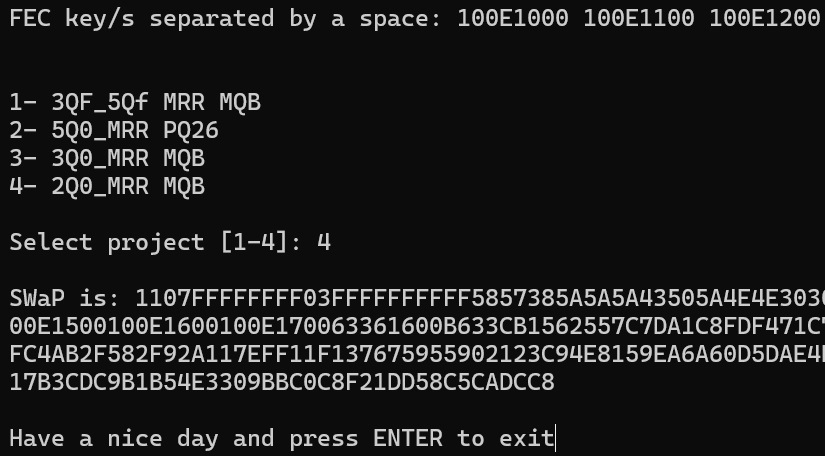
python FecCalc.py
- VIN
- VCRN
- FEC codes space-separated
- Project
4—2Q0_MRR MQB
Enter and activate SWaP (ODIS Engineering)
A5:
009 — Diagnostic session → End of line (EOL)
008 — Access authorization → 20103
007 — Adaptation → Transfer SWaP unlock code → paste generated code
005 — Basic settings → Activation of SWaP / Unlock SWaP Feature
003 — Measuring values → Status of all SWaP functions
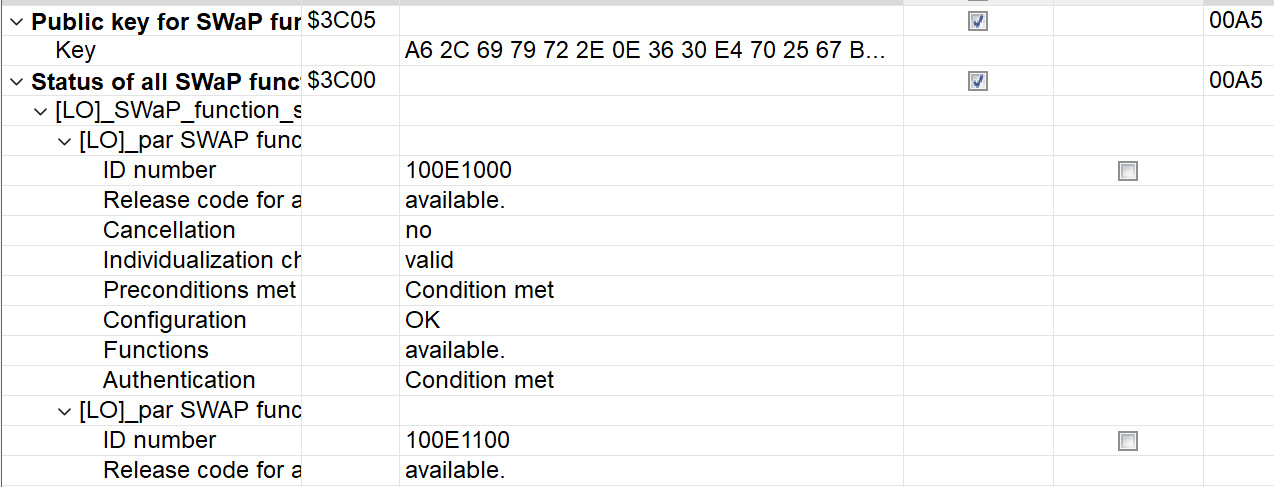
Success: each FEC shows available, valid, condition met.
Same sequence for radar 13 — pACC, step 8.
After SWaP
- Calibration if required after install — see 3Q0 calibration for similar steps and ODIS docs.
- Load the correct dataset — Camera firmwares.
- Coding A5, 44, 5F, 17, 09, 19 — 2Q0 camera coding.
TJA and some features need a dataset, not SWaP alone. Sign Assist (VZE) is mainly SWaP + coding.
Limitations
| Topic | Note |
|---|---|
| G / H firmware | RSA3072 public key, different block logic — method may not work without a separate solution |
| MQB-Evo 5WA 980 653 | Different camera/SW — not covered here |
| SFD / SFD2 | Usually not required for classic MQB 2Q0; verify on newer cars |
| Dataset | Use verified parametrization only; broken XML from editors often kills VZE |