Encoding 3Q0/3QD* (MFK 2.0) camera assistants
This manual is only suitable for cameras 3Q0980654
Lane Assist with adaptive lane guidance — adaptive guidance eliminates “ping-pong” from lane to lane.
The option is excellent: it lets you relax behind the wheel without hunting for the center of the lane; on the highway it is simply indispensable.
Traffic Jam Assist — traffic jam assistant.
This extends Lane Assist to work from 0 km/h. In a traffic jam the car steers, accelerates and brakes on its own. After stopping for more than 3 seconds, press RES or the accelerator to move off.
Emergency Assist — emergency stop assistant.
If the driver will not or cannot take part in driving, the car first wakes them with sound, then with sharp braking.
If they still do not take control, the car switches on the hazard lights and stops.
Sign Assist — traffic sign recognition assistant. Shows signs read by the camera.
Assistant camera firmware
Located here: Firmware and parameters
Assistant activations
IQ Light matrix headlights
Block A5 (assistant camera) → Coding:
AFS_coding_Light_Assist: Matrixbeam
→ Apply
Activating the assistant call button (for 5Q0 953 502 AJ / Valeo 408 876)
Block 16 → Adaptation:
Steering column electronics
Driver assistance systems button
Installed
→ Apply
Activating Lane Assist without adaptive lane guidance
Warning
To activate Lane Assist, updating parameters for the installed assistant camera is not required
Enable Lane Assist display on the instrument cluster
Block 17 (instrument cluster/ActiveInfoDisplay) → Coding:
Byte 04 – Bit 6 (Lane_assist): Activate
Byte 11 – Bit 1 (Lane_assist_BAP): Activate
Assistant camera configuration
You can use ready-made coding:
000307060007040100220044C150890080000E20004000
Block A5 (assistant camera) → Coding:
Byte 14 – change value to A0/A1
Byte 16 – Bit 7: Activate (or change byte value to 90/98)
Block A5 (assistant camera) → Adaptation:
Lan_assist_system_mode - Selection_over_menu
Lane_assist_warning_intensity - Selection_over_menu
Personalization of lane dept. warning Cl. 15 on - Last Setting (last setting)
→ Apply
HCA — tell the steering control unit that Lane Assist is present
Block 44 (steering assist) → Coding:
Byte 01 – Bit 3 (Heading_control_assist): Activate
→ Apply
Enable new functions in the menu
Block 5F (multimedia) → Adaptation:
Car_Function_List_BAP_Gen2:
- LDW_HCA_0x19: activated
Car_Function_Adaptations_Gen2:
- menu_display_Lane_Departure_Warning: Activate
- menu_display_Lane_Departure_Warning_over_threshold_high: Activate
→ Apply
Tell the parking assistant unit that Lane Assist is present (PLA3.0 with 12 sensors)
On the 2020 Tiguan 2G, PLA3.0 may appear in the system as block 10, not 76
Block 76 → Coding:
Lane assist linked to steering assist
Byte 3 – Bit 5 (HeadingControl Unterstutzung Auswahl): Activate (Spurhalteassistent aktiviert)
→ Apply
Full set: adaptive Lane Assist, Traffic Jam Assist, Sign Assist
Lane Assist with adaptive lane guidance — eliminates “ping-pong” from lane to lane.
The option is excellent: it lets you relax behind the wheel without hunting for the center of the lane; on the highway it is simply indispensable.
Warning
Traffic Jam Assist requires parameters for the installed assistant camera.
Located here: Firmware and parameters
Tell the climate control unit (08) that camera heating is installed.
Block 08 → Coding:
Byte 08 – Bit 0 (Camera heating): Installed
→ Apply
Block 08 – Long coding:
Camera heating element: not installed → installed
Tell the ACC radar that a camera is installed
Block 13 (adaptive cruise) → Coding:
Byte 03 – Bit 6 (Front_camera): Installed
→ Apply
Block 13 → Long coding:
Front_camera: not installed → installed
Change high-beam assistant type from simple to MDF — masked or non-dazzling high beam. Add the assistant to the menu
Block 09 (on-board network) → Adaptation:
Aussenlicht_Blinker:
- Warnblinken_durch_Fahrerassistenz: available
Fernlicht_assistent:
- Erweiterte_Fernlichtsteuerung: AFS, FLA, Fernlicht ueber AFS → AFS, FLA, Fernlicht (GLW,MDF)
- Menuesteuerung Fernlichtassistent: available
- Fernlichtassistent Reset: Deactivate
- Menuesteuerung Fernlichtassistent Werkseinstellung: available
- Assistance_lighting_sensitivity_adjustable: detected
→ Apply
Enable Lane Assist and road sign display on the instrument cluster
Block 17 (instrument cluster/ActiveInfoDisplay) → Coding:
Byte 04 – Bit 6 (Lane_assist): Activate
Byte 11 – Bit 1 (Lane_assist_BAP): Activate (add Lane Assist to instrument cluster assistant menu)
Byte 05 – Bit 2 (traffic_sign_display): Activate
→ Apply
Block 17 → Long coding:
Lane assist: No → Yes
Road sign recognition: No → Yes
Lane assist, BAP, route: No → Yes
Activate installed modules: add A5 (front driver assistance sensors) and remove block 20 (FLA camera mirror)
Block 19 (gateway) → Adaptation:
Gateway_Component_List: Node_0x30: not_coded
Gateway_Component_List: Node_0x4F: coded
→ Apply
Block 19 → Adaptation:
High beam assistant: Not coded.
Front driver assistance sensors: Coded
HCA — tell the steering control unit that Lane Assist is present
Block 44 (steering assist) → Coding:
Byte 03 – Bit 0 (Heading_control_assist): Activate
→ Apply
Block 44 → Long coding:
Lane assist: active
Headlight unit setup
Attention!
Changing coding in this block resets basic headlight settings. How to restore basic settings?
Block 4B (multifunction module) → Coding:
Byte 10 – Bit 6 (mdf_activation): Activate
headlamp_coding_word: 1
multi_function_camera: installed
→ Apply
Block 4B → Coding:
headlamp_coding_word: 0 → 1
mdf_activation: not unlocked → unlocked
Tell the ABS unit that emergency braking is available
Block 03 (ABS) → Coding:
Byte 29 – Bit 5 (Electromechanical parking brake): Activate (emergenay braking)
→ Apply
Configure block 3C (lane change assistant)
Block 3C → Coding:
Lane_Departure_Warning_System:_with_Lane_Departure_Warning_System
Front_Sensors_Driver_Assistance_System:_with_Front_Sensors_Driver_Assistance_System
→ Apply
Tell the parking assistant unit that Lane Assist is present (PLA with 12 sensors)
Useful information
On the 2020 Tiguan 2G, PLA3.0 may appear in the system as block 10, not 76
Block 76 → Coding:
Lane assist linked to steering assist
Byte 3 – Bit 5 (HeadingControl Unterstutzung Auswahl): Activate (Spurhalteassistent aktiviert)
→ Apply
Enable new functions in the menu
Block 5F (multimedia) → Adaptation:
Car_Function_List_BAP_Gen2:
- LDW_HCA_0x19: Activate
- traffic_sign_recognition_0x21: Activate
- traffic_sign_recognition_0x21_msg_bus: CAN_Extended (additional data bus)
Car_Function_Adaptations_Gen2:
- menu_display_Lane_Departure_Warning: Activate
- menu_display_Lane_Departure_Warning_over_threshol d_high: Activate
- menu_display_road_sign_identification: Activate
- menu_display_road_sign_identification_over_threshold_high: Activate
→ Apply
Tell the projection unit (if fitted)
Block 82 → Coding:
Road_sign_detection: available
Lane_departure_warning: available
→ Apply
Assistant camera configuration.
Ready-made coding
000307060007040100222346C154890098000E20004000
For convenience use the bit calculator with A5 block decoding.
For example, open the ready-made coding in the calculator
Block A5 (assistant camera) → Coding:
Brand: VW
Class: A
Generation: Generation_7
Bodystyle: Suv
Expansion: Not_coded
Production_region: EU
Country_variant: Europe
Chassis: Steel_springs
Steering_bar: Not_coded
Windshield: Heat_protecting_glass
Traffic_side: Right_traffic
PSD_Version: PSD_15 # (1)!
Navigation: MIB_High # (2)!
AAG: Coded # (3)!
SWA (Side assist): Coded # (4)!
ACC: Coded
Pedestrian_break: Not_coded
Blind_spot_detection: Not_coded
Rain_light_sensor: Coded
Main_unit: enabled
PLA: Coded # (5)!
ESP: Coded
Personalize_VZE:    Not_Coded
Lan_assist_system_mode: Selection_over_menu
Personalized_key: Version_1.x
Networking_variant: MQB
Radar_interface: Coded
Perso_HC: Last_setting # (6)!
Point_of_intervention: early_setting_over_menu
LaneAssist_AGW_output: disabled
Lane_assist_off_text: disabled
Emergency_Assist: EA_Variant_2
Traffic Sign Recognition (TSR/VZE): coded
HC_mob_line: Not_coded
HC: Coded
FCWP_default_on_prewarning: last_mode
FCWP_delivery_status_prewarning: off
FCWP_extended_prewarning_settings: Not_coded
FCWP_warning_indicator: Not_coded
FCWP: Not_coded
FLA_Additional_High_Beam: no_Additional_High_Beam
FLA_Headinglight_type: LED
Mains_frequency: 50_Hz
AFS_coding_Light_Assist: Dynamic_Light_Assist (or Matrixbeam for Tiguan 2021)
HC_LONGPRESS: Not_Coded (only for Audi)
→ Apply
- Predictive route data. Depends on the head unit (if no navigation, use
Not coded) - Navigation type. Depends on the head unit
- If a tow bar is fitted
- If blind spot monitoring is fitted
- If Park Assist is fitted
- Remember the selected mode when the ignition is switched off
These adaptations disable warnings about non-working signs
Block A5 (assistant camera) → Adaptation:
Road_sign_recognition_fusion_mode (road sign recognition: Fusion mode): Road_Sign_Fusion
Lane_assist_warning_intensity (lane assist warning intensity): Selection_over_menu
Personalisation_point_of_intervention (intervention moment personalization): Last Setting (last setting)
Adaptation_tsr:
- Par_relevance_mode: enabled
- Par_country_mode: manuel
- Par_country_code_RSR: 205 # (1)!
- Par_country_code_VZF: 205
→ Apply
- For CIS countries you can use Poland’s value. Possible values:
57 — Czech Republic
68 — Estonia (50/90/90)
73 — Finland
74 — France
82 — Germany
118 — Latvia
124 — Lithuania (50/90/130)
172 — Poland (50/60/90/100/120/140)
173 — Portugal
177 — Romania
178 — Russia
197 — Spain
205 — Sweden (50/90/110)
BAP Personalization
BAP Personalization — per-key profile storage. On Tiguan this option is not used; the value has no effect.
Separating road signs
You can show navigation database speed limits (Sat Nav Speed Limits) on the head unit,
and camera-read signs on AID (Virtual Cockpit).
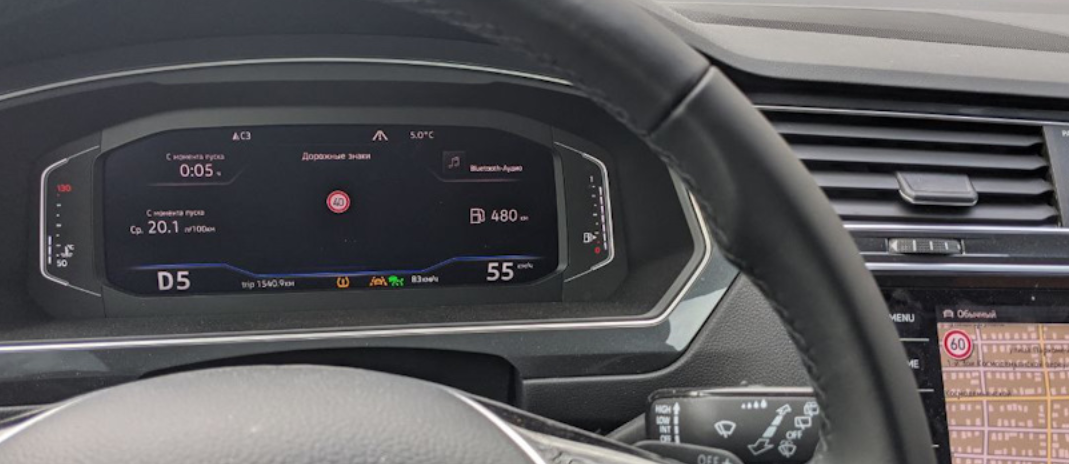
Block 5F (multimedia) → Adaptation:
Car_Function_List_BAP_Gen2:
- traffic_sign_recognition_0x21: Deactivate
→ Apply
Car_Function_Adaptations_Gen2:
- menu_display_road_sign_identification: Deactivate
- menu_display_road_sign_identification_over_threshold_high: Deactivate
→ Apply
Block 5F (multimedia) → Coding:
byte_24_vza: Activate
Intersection lighting when approaching
Top-spec MID LED headlights can switch on side light at intersections and aim light into turns early using navigation data.
Block 4B → Coding:
psd_data: Activate
Crossing_light_with_route_data: Activate — enables side light when approaching an intersection
Predictive_afs: Activate — aims light into turns using navigation map data
Basic headlight setup is required afterwards!